

Основе тикета
Нови сте у системима за тикете? Тада наставите са читањем о основама. Ово вам помаже да разумете главне концепте и започнете рад са Zammad-ом. Ако већ познаје системе за тикете, можете прескочити директно на наредне странице о проналажењу, креирању и раду са тикетима.
Увод
У Zammad-у се тикети користе за праћење тикета корисничке службе. Приликом првог контакта клијента са вама у вези нечега, Zammad креира нови тикет. Свака порука послата између вас и клијента додаје се том тикету док се проблем не реши, клијент не буде задовољан и тикет се коначно не затвори. Таква појединачна порука у тикету назива се чланак. У суштини, тикет можете посматрати као разговор између вас и клијента о једном проблему.
Уколико сте потпуно нови у водама тикетинг система и до сада сте решавали захтеве клијента уз помоћ имејл клијента, можете помислити да је тикет систем компликован. Али супротно је тачно:
- Све имејл поруке се сада сливају у Zammad (као и остали захтеви са других канала).
- Ви и ваше колеге можете видети ко обрађује који захтев клијента („тикет”).
- The history (who did what?) and the state of each request are transparent.
- Нема дуплиране обраде и ништа се не превиђа.
- Можете питати колеге за помоћ око компликованих случајева директно у тикету.
- За Zammad-овим иновативним корисничким интерфејсом, можете се усредсредити на оно најбитније: да решите проблеме клијената и одговорите на њихова питања.
Ово значи да можете наставити рад са Zammad-ом на сличан начин као у вашем имејл клијенту. Осим што тикет има додатне атрибуте. Читајте даље да сазнате више.
Атрибути тикета
Поред чланака, тикети поседују и неке додатне мета податке који се зову атрибути. Користите бочну траку тикета за преглед и измену атрибута тикета.
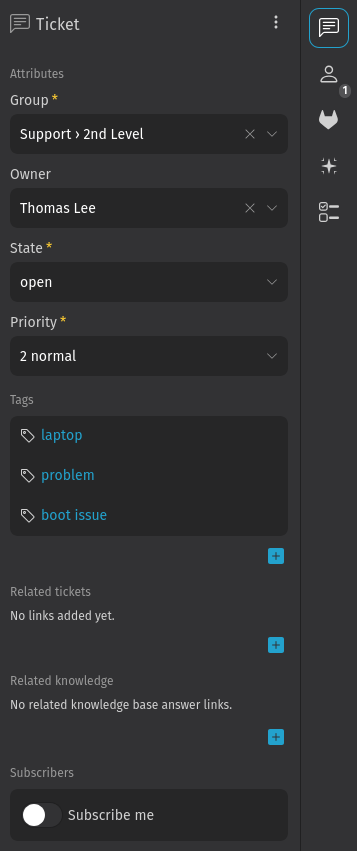
Да сакријете бочну траку, кликните на дугме за преклапање са стрелицом на левој страни бочне траке. Кликом на једну од картица поново је приказујете. Доступне опције зависе од ваших овлашћења и конфигурације система.
Могуће је чак креирати и прилагођена поља за тикете (и за групе, кориснике и организације). Да ли мислите да би такво прилагођено поље имало смисла? Разговарајте са вашим Zammad администратором, може се лако подесити.
Група
Овај атрибут тикета је користан за организација са више од једног тима. Стандардан начин за коришћење група је да имате по једну за свако одељење ваше фирме. У зависности од дозвола, можда нећете видети тикет након промене групе и снимања измена. У случају да не видите поље групе, или постој исамо једна у вашем Zammad систему или немате дозволу за отварање тикета у другим групама.
Власник
Ово је особа која је тренутно одговорна за тикет. У случају да вам је потребна информација од другог колеге, можете или променити власника на ту особу или поменути ту особу у чланку куцајући @@ и изабирајући корисника. У другом случају, корисник ће бити обавештен и аутоматски претплаћен на добијање обавештења о ажурирањима тикета.
За промену власника на особу која има приступ само некој другој групи тикета, морате прво променити групу.
Стање
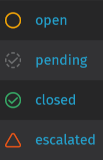
Стање одражава тренутни статус тикета (углавном да ли је клијентов захтев решен или не). Можете га сматрати репрезентацијом прогреса на путу решења. Подразумевано, доступна су следећа стања:
- Ново: Статус за нове тикете на којима нико још није радио. Приликом ажурирања тикета по први пут, аутоматски прелази у статус отворен.
- Отворено: Стање за тикете који још нису решени и захтевају обраду.
- Чека на затварање: Стање за тикете који су практично решени али не желите одмах да их затворите. Ово стање захтева да унесете датум и време када ће тикет бити аутоматски затворен.
- Чека на подсетник: Стање за отворене тикете за које желите да вас подсетимо на одређен датум и време. Захтева да унесете датум и време када желите да будете обавештени. Нпр. корисно је уколико сте послали питање трећем лицу и желите да се осигурате да овај проблем неће бити заборављен.
- Спојено: Статус за тикет који је спојен у други тикет. Погледајте повезане тикете да видите повезани тикет.
Статуси тикета у Zammad-у су означени бојама. Ово вам помаже да брже уопштено схватите статус тикета - без дубљег уласка у детаље.
Приоритет
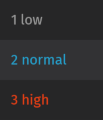
Приоритет тикета је једноставно рангирање (од 1 до 3) колико је хитан или важан. Три подразумевана приоритета су:
- 1 низак
- 2 нормалан
- 3 висок
У случају да ови приоритети нису довољни, затражите од Zammad администратора да креира додатне. Подразумевани приоритети вам омогућавају да одмах препознате важност ваших тикета јер су означени бојама:
Можта се питате чему служи приоритет тикета. Сам по себи, заправо ништа не чини осим наглашавања. Међутим, Zammad администратори могу да подесе разне врсте аутоматизаиција и статистика на основу приоритета.
Имајте на уму да клијенти не могу постављати приоритет за своје сопствене тикете. У супротном, неки би увек постављали висок приоритет и очекивали хитну ескалацију.
Ознаке
Ознаке су један од начина категоризације тикета. О ознакама можете размишљати као о некој врсти тагова. Могу се користити у условима окидача и прегледа и могу бити додељени аутоматски од стране макроа, планера и окидача. Наравно, можете вршити претрагу по тексту ознаке и пронаћи тикете који имају додељену ознаку.
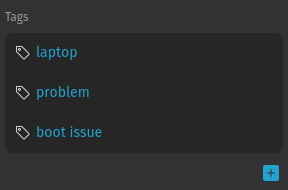
У бочној траци тикета можете пронаћи секцију која је означена као Тагови. Додајте таг кликом на дугме . Зависно од конфигурације вашег Zammad-а, нове тагове можете креирати једноставним куцаањем и потврђивањем са enter или tab. У сваком случају, можете изабрати између већ доступних тагова. Почните да куцате и видећете листу са одговарајућим предлозима. Да бисте га уклонили, кликните на дугме на десној страни тага.
Сада када знате основе, пређите на једну од наредних страница: