

Secure email
Zammad supports two systems for secure email communication:
- PGP (Pretty Good Privacy)
- S/MIME (Secure/Multipurpose Internet Mail Extensions)
Both systems allow you to exchange signed and encrypted messages with others.
Prerequisites
- Both features are optional. If you don't see the
EncryptandSignbuttons in the email article editor, your administrator has not activated them yet. - PGP and S/MIME only work if the other party is using them too.
- Your administrator is responsible for adding all necessary certificates and keys in Zammad's admin settings.
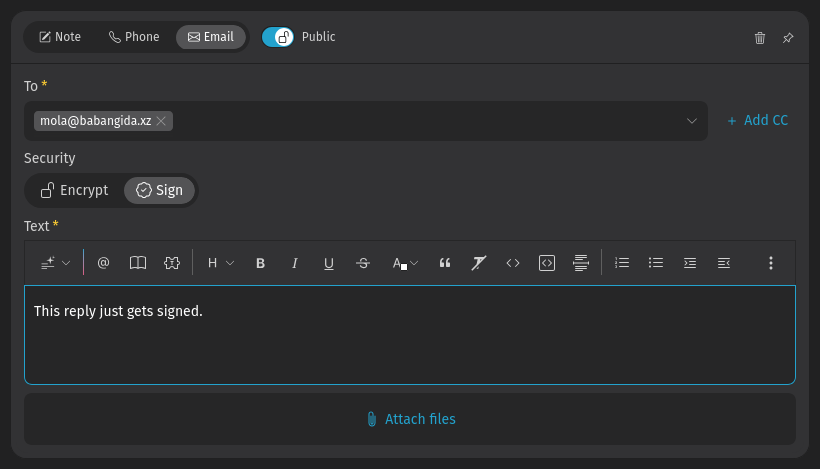
If these requirements are met, the feature should work out of the box and Zammad encrypts, decrypts, signs and verifies signatures of emails if possible. Your admin can define a default behavior for each group. However, you can override the default for each outgoing email article on your own by switching encryption and signing on or off (see example in screenshot below with turned off encryption and activated signing). Read on to learn more about it and to find common errors.
Signing & encryption
- Signing
- Signing is a proof that a message has not been manipulated on its way. It guarantees message integrity and authenticity.
- Encryption
- Encryption scrambles a message so that it can only be unscrambled by the intended recipient. It guarantees message privacy and data security.
Incoming email
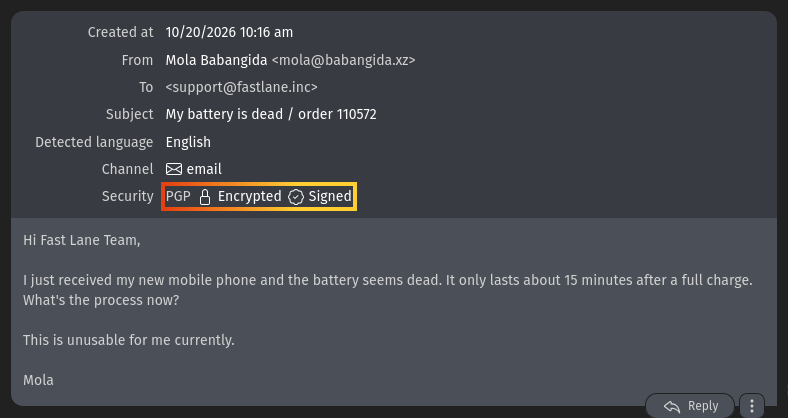
The lock and check icons at the top of a message indicate its encryption and signing status. Click on an incoming message article to expand its details. In the details, you can hover over the security status to see more information.
Status icons for incoming emails
| Icon | Meaning |
|---|---|
 | Encrypted for you. Even if intercepted by a third party, they will not be able to read it. |
 | Cannot be decrypted. Zammad lacks the required key to decrypt this message. |
 | Successfully verified. You can be confident it is authentic and the content has not been modified. |
 | Signature verification failed. Hover over the icon for more information. |
Outgoing email
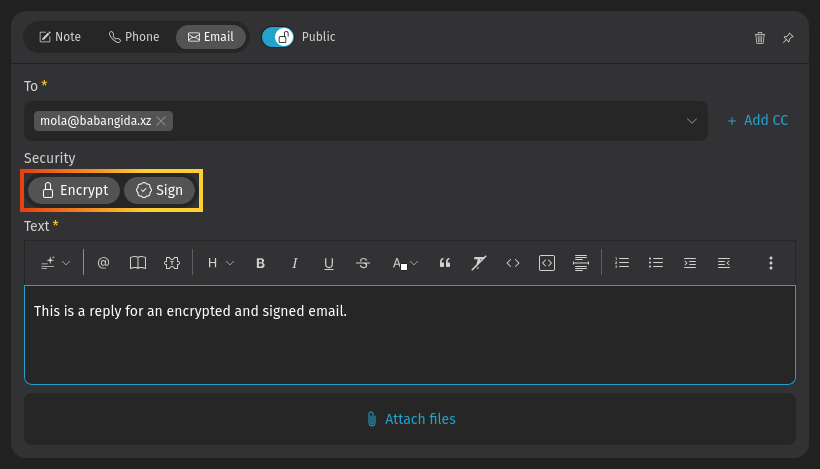
Use the Encrypt and Sign buttons to turn on encryption and signing for outgoing emails. They are available for new tickets and replies. Hover over the buttons to show details.
INFO
Outgoing emails can only be encrypted for a single recipient.
Status icons for outgoing emails
| Icon | Meaning |
|---|---|
| Will be encrypted. Even if intercepted by a third party, they will not be able to read it. |
| Will not be encrypted. |
| Will be signed. Recipients can verify that it came from you and that the content has not been modified. |
| Will not be signed. |
Troubleshooting
Sign: Unable to find certificate for validation
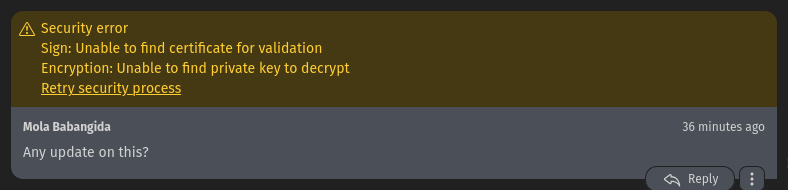
Without the sender's certificate, Zammad cannot verify the message signature. Ask your administrator to add the sender's certificate to Zammad's certificate store.
WARNING
Always verify certificates in-person or over the phone! The whole point of signature verification is to alert you when someone is trying to pretend to be someone they are not. Never accept a certificate from someone online without verifying it first.
Encryption: Unable to find private key to decrypt
This message was encrypted with a certificate that does not match any on file. Without a matching private key, Zammad cannot decrypt the message. Ask your administrator to verify your organization's private key in Zammad's certificate store, and ask the sender to double-check the public key they used to encrypt the message.
The Encrypt button is disabled
Ask your administrator to add the recipient's certificate to Zammad's certificate store.
The Sign button is disabled
Ask your administrator to verify your organization's private key in Zammad's certificate store.
Multiple security types configured
You might see both PGP and S/MIME buttons. This happens when both systems are configured in your system and a customer is using both as well. In this case, you have an additional button to switch between PGP and S/MIME security types. Just pick one, make sure encryption and signing is enabled and send your email.